






radis.spectrum.operations module
Handy functions for manipulation of Spectrum objects
Routine Listing
Operators:
multiply(): simply uses*2add_constant(): simply uses+1add_array(): simply uses+aadd_spectra(): simply uses1+s2substract_spectra(): simply uses1-s2
Note that these operators are purely algebraic and should not be used in place
of the line-of-sight functions, i.e, SerialSlabs() (>)
and MergeSlabs() (//)
Functions to manipulate one spectrum:
Play with baselines:
Functions to discard all but one spectral quantity:
Keeps all spectral quantities, but make emission equal to 0 (useful when calculating contributions of line of sight slabs):
Examples
Most of these functions are implemented with the standard operators. Ex:
((s_exp - 0.1)*10).plot() # works for a Spectrum s_exp
- PerfectAbsorber(s: Spectrum) Spectrum[source]
Makes a new Spectrum with the same transmittance/absorbance as Spectrum
s, but with radiance set to 0. Useful to get contribution of different slabs in line-of-sight calculations (see example).- Parameters:
s (Spectrum) –
Spectrumobject- Returns:
s_tr –
Spectrumobject, with only thetransmittance,absorbanceand/orabscoeffpart ofs, whereradiance_noslit,emisscoeffandemissivity_noslit(if they exist) have been set to 0- Return type:
Examples
Let’s say you have a total line of sight:
s_los = s1 > s2 > s3
If you now want to get the contribution of
s2to the line-of-sight emission, you can do:(s2 > PerfectAbsorber(s3)).plot('radiance_noslit')
And the contribution of
s1would be:(s1 > PerfectAbsorber(s2>s3)).plot('radiance_noslit')
See more examples in Line-of-Sight module
- Radiance(s: Spectrum) Spectrum[source]
Returns a new Spectrum with only the
radiancecomponent ofs- Parameters:
s (Spectrum) –
Spectrumobject- Returns:
s_tr –
Spectrumobject, with onlyradiancedefined- Return type:
Examples
This function is useful to use Spectrum algebra operations:
s = calc_spectrum(...)   # contains emission & absorption arrays
rad = Radiance(s)        # contains radiance array only
rad -= 0.1    # arithmetic operation is applied to Radiance only
Equivalent to:
rad = s.take('radiance')
See also
Radiance_noslit(),Transmittance_noslit(),Transmittance(),take()
- Radiance_noslit(s: Spectrum) Spectrum[source]
Returns a new Spectrum with only the
radiance_noslitcomponent ofs- Parameters:
s (Spectrum) –
Spectrumobject- Returns:
s_tr –
Spectrumobject, with onlyradiance_noslitdefined- Return type:
Examples
This function is useful to use Spectrum algebra operations:
s = calc_spectrum(...)   # contains emission & absorption arrays
rad = Radiance_noslit(s) # contains 'radiance_noslit' array only
rad -= 0.1    # arithmetic operation is applied to Radiance_noslit only
Equivalent to:
rad = s.take('radiance_noslit')
See also
- Transmittance(s: Spectrum) Spectrum[source]
Returns a new Spectrum with only the
transmittancecomponent ofs- Parameters:
s (Spectrum) –
Spectrumobject- Returns:
s_tr –
Spectrumobject, with only thetransmittance,absorbanceand/orabscoeffpart ofs, whereradiance_noslit,emisscoeffandemissivity_noslit(if they exist) have been set to 0- Return type:
Examples
This function is useful to use Spectrum algebra operations:
s = calc_spectrum(...)   # contains emission & absorption arrays
tr = Transmittance(s)    # contains 'radiance_noslit' array only
tr -= 0.1    # arithmetic operation is applied to Transmittance only
Equivalent to:
rad = s.take('transmittance')
See also
Transmittance_noslit(),Radiance_noslit(),Radiance(),take()
- Transmittance_noslit(s: Spectrum) Spectrum[source]
Returns a new Spectrum with only the
transmittance_noslitcomponent ofs- Parameters:
s (Spectrum) –
Spectrumobject- Returns:
s_tr –
Spectrumobject, with onlytransmittance_noslitdefined- Return type:
Examples
This function is useful to use Spectrum algebra operations:
s = calc_spectrum(...)   # contains emission & absorption arrays
tr = Transmittance_noslit(s) # contains 'radiance_noslit' array only
tr -= 0.1    # arithmetic operation is applied to Transmittance_noslit only
Equivalent to:
rad = s.take('transmittance_noslit')
See also
- add_array(s, a, unit=None, var=None, inplace=False)[source]
Return a new spectrum with a constant added to s[var]. Equivalent to:
s + array
- Parameters:
s (Spectrum objects) – Spectrum you want to modify
a (numpy array, or
Quantity) – array to add. Must have the same length as variablevarin Spectrums. Can be dimensioned withunits.unit (str) – unit for
a. IfNone, uses the default unit insfor variablevar.var (str, or
None) – ‘radiance’, ‘transmittance’, … IfNone, get the unique spectral quantity ofsor raises an error if there is any ambiguityinplace (bool) – if
True, modifiessdirectly. Else, returns a copy. DefaultFalse
- Returns:
s – Spectrum object where array
ais added to intensity of s[‘var’] Ifinplace=True,shas been modified directly.- Return type:
Notes
Use only for rough work. If you want to work properly with spectrum objects, see MergeSlabs.
Examples
Add Gaussian noise to your Spectrum (assuming there is only one spectral quantity defined):
s += np.random.normal(0,1,len(s.get_wavelength()))
- add_constant(s, cst, unit=None, var=None, inplace=False)[source]
Return a new spectrum with a constant added to s[var]. Equivalent to:
s + constant
- Parameters:
s (Spectrum objects) – Spectrum you want to modify
cst (float) – Constant to add.
unit (str) – unit for
cst. IfNone, uses the default unit insfor variablevar.var (str, or
None) – ‘radiance’, ‘transmittance’, … IfNone, get the unique spectral quantity ofsor raises an error if there is any ambiguityinplace (bool) – if
True, modifiessdirectly. Else, returns a copy. DefaultFalse
- Returns:
s – Spectrum object where cst is added to intensity of s[‘var’] If
inplace=True,shas been modified directly.- Return type:
Notes
Use only for rough work. If you want to work properly with spectrum objects, see
MergeSlabs().
- add_spectra(s1, s2, var=None, force=False)[source]
Return a new spectrum with
s2added tos1. Equivalent to:s1 + s2
Warning
we are just algebraically adding the quantities. If you want to merge spectra while preserving the radiative transfer equation, see
MergeSlabs()andSerialSlabs()- Parameters:
s1, s2 (Spectrum objects) – Spectrum you want to substract
var (str) – quantity to manipulate: ‘radiance’, ‘transmittance’, … If
None, get the unique spectral quantity ofs1, or the unique spectral quantity ofs2, or raises an error if there is any ambiguity
- Returns:
s – Spectrum object with the same units and waveunits as
s1- Return type:
See also
- concat_spectra(s1, s2, var=None)[source]
Concatenate two spectra
s1ands2side by side.Note: their spectral range should not overlap
- Returns:
s – Spectrum object with the same units and waveunits as
s1- Return type:
- Parameters:
s1, s2 (Spectrum objects) – Spectrum you want to concatenate
var (str) – quantity to manipulate: ‘radiance’, ‘transmittance’, … If
None, get the unique spectral quantity ofs1, or the unique spectral quantity ofs2, or raises an error if there is any ambiguity
Notes
Warning
the output Spectrum has the sum of the spectral ranges of s1 and s2. It won’t be evenly spaced. This means that you cannot apply a slit without side effects. Typically, you want to use this function for convolved quantities only, such as experimental spectra. Else, use
MergeSlabs()with the optionsresample='full', out='transparent'See also
- crop(s: Spectrum, wmin: float = None, wmax: float = None, wunit: str = None, inplace: str = False) Spectrum[source]
Crop spectrum to
wmin-wmaxrange inwunit- Parameters:
s (Spectrum object) – object to crop
wmin, wmax (float, or None) – boundaries of spectral range (in
wunit)- wunit:
'nm','cm-1','nm_vac' which waveunit to use for
wmin, wmax. Ifdefault: use the default Spectrum wavespace defined withget_waveunit().
- wunit:
- Other Parameters:
inplace (bool) – if
True, modifysdirectly. Else, returns a copy.- Returns:
s_crop – a cropped Spectrum. if using
inplace, thens_cropandsare still the same object- Return type:
Examples
crop(s, 420, 480, 'nm', 'air')
Or in
cm-1:crop(s, 2000, 2300, 'cm-1')
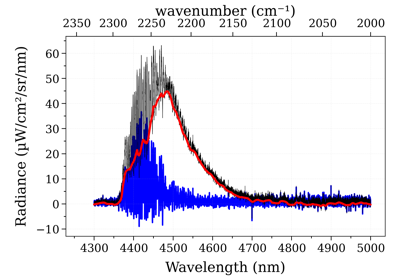
- get_baseline(s, var='radiance', algorithm='als', wunit='default', Iunit='default', **kwargs)[source]
Calculate and returns a baseline
- Parameters:
s (Spectrum) – Spectrum which needs a baseline
var (str) – on which spectral quantity to read the baseline. Default
'radiance'. SeeSPECTRAL_QUANTITIESalgorithm (‘als’, ‘polynomial’) – Asymmetric least square or Polynomial fit
**kwargs (dict) – additional parameters to send to the algorithm. By default, for ‘polynomial’:
for ‘als’:
- **kwargs = {“asymmetry_param”: 0.05,
“smoothness_param”: 1e6}
- Returns:
baseline – Spectrum object where intensity is the baseline of s is computed by peakutils
- Return type:
Examples
See also
- multiply(s, coef, unit=None, var=None, inplace=False)[source]
Multiply s[var] by the float ‘coef’
- Parameters:
s (Spectrum object) – The spectrum to multiply.
coef (float) – Coefficient of the multiplication.
unit (str, or
Unit) – unit forcoef. IfNone,coefis considered to be adimensioned. Else, the spectrumunitsis multiplied.var (str, or
None) – ‘radiance’, ‘transmittance’, … IfNone, get the unique spectral quantity ofsor raises an error if there is any ambiguityinplace (bool) – if
True, modifiessdirectly. Else, returns a copy. DefaultFalse
- Returns:
s – Spectrum object where intensity of s[‘var’] is multiplied by coef If
inplace=True,shas been modified directly.- Return type:
- offset(s: Spectrum, offset: float, unit: str, name: str = None, inplace: bool = False) Spectrum[source]
Offset the spectrum by a wavelength or wavenumber
- Parameters:
s (Spectrum) – Spectrum you want to modify
offset (float) – Constant to add to all quantities in the Spectrum.
unit (‘nm’ or ‘cm-1’) – unit for
offset.
- Other Parameters:
name (str) – name of output spectrum
inplace (bool) – if
True, modifiessdirectly. Else, returns a copy. DefaultFalse
- Returns:
s – Spectrum object where cst is added to intensity of s[‘var’] If
inplace=True,shas been modified directly.- Return type:
See also
call
- sub_baseline(s, left, right, unit=None, var=None, inplace=False)[source]
Return a new spectrum with a baseline subtracted to s[var]
- Parameters:
s (Spectrum objects) – Spectrum you want to modify
left (Float) – Constant to substract on the left of the spectrum.
right (Float) – Constant to substract on the right of the spectrum.
unit (str) – unit for
cst. IfNone, uses the default unit insfor variablevar.var (str) – ‘radiance’, ‘transmittance’, … If
None, get the unique spectral quantity ofsor raises an error if there is any ambiguityinplace (bool) – if
True, modifiessdirectly. Else, returns a copy. DefaultFalse
- Returns:
s – Spectrum object where the baseline was subtracted to intensity of s[‘var’] If
inplace=True,shas been modified directly.- Return type:
Notes
Use only for rough work.
See also
- substract_spectra(s1, s2, var=None)[source]
Return a new spectrum with
s2subtracted froms1. Equivalent to:s1 - s2
- Parameters:
s1, s2 (Spectrum objects) – Spectrum you want to substract
var (str) – quantity to manipulate: ‘radiance’, ‘transmittance’, … If
None, get the unique spectral quantity ofs1, or the unique spectral quantity ofs2, or raises an error if there is any ambiguity
- Returns:
s – Spectrum object with the same units and waveunits as
s1- Return type:
See also