






Explore Line Database Parameters
Database will be downloaded automatically and can be edited locally.
The Download HITRAN Database example showed how to download the HITRAN database under Pandas format.
RADIS can also be used to explore and visualize larger databases, using the
underlying vaex library.
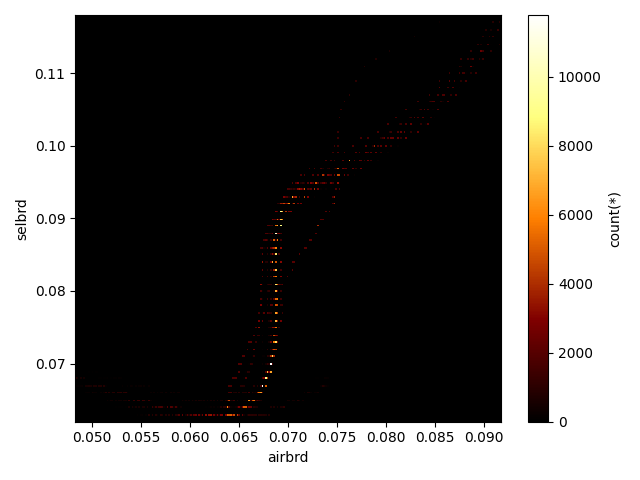
In this example, we plot the dependance of the broadening coefficients to the rotational number and the line density.
import matplotlib.pyplot as plt

from radis.io.hitran import fetch_hitran
June 2024: vaex is not compatible with python>=3.11, see https://github.com/radis/radis/pull/656 and the WIP solution here https://github.com/radis/radis/pull/698
try:
    import vaex

    output = "vaex"
    vaex  # fix linting
except ImportError:
    output = "pytables"  # standard pandas format

df = fetch_hitran("CO2", output=output, load_wavenum_min=100, load_wavenum_max=10000)
print(f"{len(df)} lines in HITRAN CO2; 2150 - 2450 cm-1")
--------------------------------------------------------------------------------
CO2 - HITRAN - Downloading database
--------------------------------------------------------------------------------

Download:
- Downloading all isotopes for CO2

Downloading isotopes:   0%|          | 0/9 [00:00<?, ?it/s]
Downloading isotopes:  11%|█         | 1/9 [00:07<01:02,  7.84s/it]
Downloading isotopes:  22%|██▏       | 2/9 [00:12<00:41,  5.98s/it]
Downloading isotopes:  33%|███▎      | 3/9 [00:18<00:35,  5.89s/it]
Downloading isotopes:  44%|████▍     | 4/9 [00:23<00:27,  5.48s/it]
Downloading isotopes:  56%|█████▌    | 5/9 [00:26<00:18,  4.59s/it]
Downloading isotopes:  67%|██████▋   | 6/9 [00:28<00:11,  3.69s/it]
Downloading isotopes:  78%|███████▊  | 7/9 [00:29<00:05,  2.83s/it]
Downloading isotopes:  89%|████████▉ | 8/9 [00:30<00:02,  2.32s/it]
Downloading isotopes: 100%|██████████| 9/9 [00:31<00:00,  1.82s/it]
Downloading isotopes: 100%|██████████| 9/9 [00:31<00:00,  3.46s/it]

HITRAN database download complete
Added HITRAN-CO2 database in /home/docs/radis.json
529535 lines in HITRAN CO2; 2150 - 2450 cm-1
if output == "vaex":
    # Note the use of `output='vaex'` in :py:func:`~radis.io.hitran.fetch_hitran` above.
    # The returned DataFrame, df, is a Vaex DataFrame.
    # Loading times takes only few tens of milliseconds even for the largest HITEMP or ExoMol
    # databases
    #
    # We can also use Vaex graph functions.
    # See Vaex vizualisations : https://vaex.readthedocs.io/en/latest/guides/advanced_plotting.html#
    #

    plt.figure()
    df.viz.heatmap("jl", "airbrd", limits="99%")

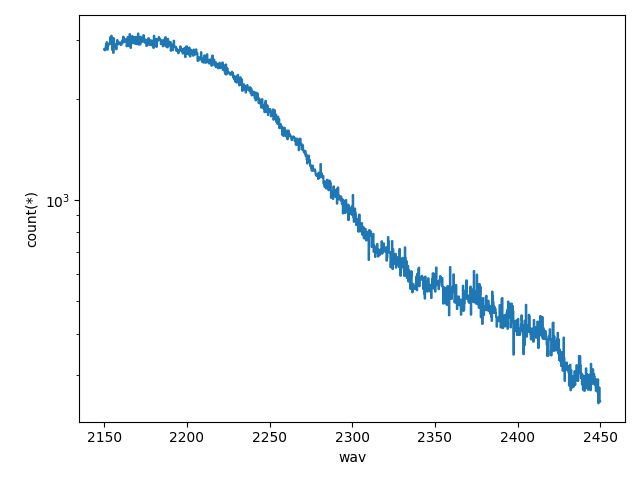
    # Or below we plot the number of lines using Vaex's :py:meth:`~vaex.viz.DataFrameAccessorViz.histogram
    plt.figure()
    df.viz.histogram("wav", shape=1000)
    plt.yscale("log")

elif output == "pytables":

    df.plot.hexbin(x="jl", y="airbrd", gridsize=30)

    # Or below we plot the number of lines using pandas' histogram
    plt.figure()
    df["wav"].plot.hist(bins=100, logy=True)
Total running time of the script: (0 minutes 37.216 seconds)